
Getting Google AdSense approval is a big milestone for any new website owner. However, many beginners face rejection not because AdSense is impossible to get, but because of small, avoidable mistakes. Google has strict policies to protect advertisers and users, and even one weak area can delay approval.
In this guide, we’ll break down the most common AdSense approval mistakes beginners make, explain why Google rejects sites, and show you practical fixes that actually work. This article is 100% Google-safe and SEO-friendly.
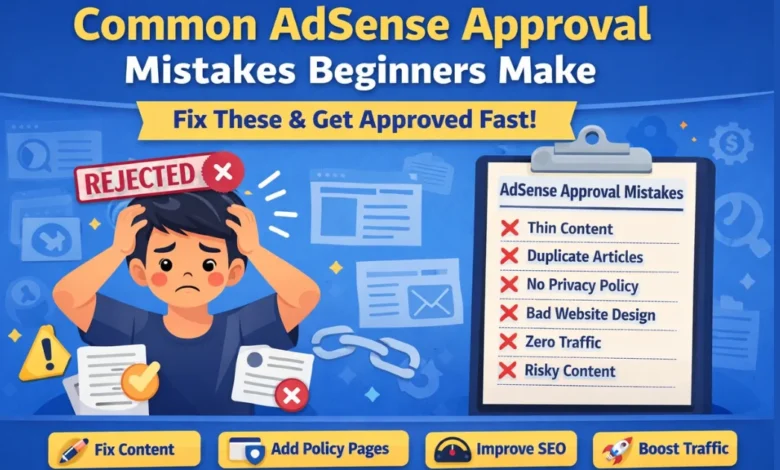
1. Low-Quality or Thin Content
The Mistake
One of the biggest reasons AdSense rejects beginner websites is thin or low-value content. This includes:
- Short articles under 500 words
- AI-generated content with no human editing
- Articles that don’t solve a real problem
Google wants content that is useful, original, and informative.
How to Fix It
- Publish at least 15–20 high-quality articles
- Each post should be 800–1200 words
- Write in clear, simple language
- Add examples, steps, FAQs, and practical tips
👉 Tip: Ask yourself, “Would I trust this article if I were a visitor?”
2. Copied or Duplicate Content
The Mistake
Many beginners copy content from:
- Other blogs
- YouTube descriptions
- ChatGPT without editing
Google’s systems easily detect duplicate or spun content.
How to Fix It
- Always write original content
- If using AI, rewrite and personalize it
- Check plagiarism before publishing
- Add your own experience or examples
Unique content builds trust with both Google and users.
3. Missing Important Pages (Policy Pages)
The Mistake
Applying for AdSense without essential pages is a common beginner error.
Missing pages include:
- About Us
- Contact Us
- Privacy Policy
- Terms & Conditions
These pages show Google that your site is legitimate and transparent.
How to Fix It
Create professional pages and link them in your footer menu.
Make sure:
- Contact page has a form or email
- About page explains your site’s purpose
- Privacy policy mentions cookies and ads
4. Poor Website Design and Navigation
The Mistake
Messy layouts, broken menus, or confusing navigation hurt user experience. Google prioritizes user-friendly websites.
Common issues:
- Too many ads or popups
- Broken links
- No clear menu structure
How to Fix It
- Use a clean, responsive theme
- Simple menu: Home, Blog, About, Contact
- Ensure fast loading speed
- Make site mobile-friendly
A clean site increases approval chances and future earnings.
5. Applying for AdSense Too Early
The Mistake
Many beginners apply for AdSense within a few days of launching their website. New sites with no authority are often rejected.
How to Fix It
Before applying:
- Let your site age at least 3–4 weeks
- Publish content consistently
- Get some organic traffic (even small)
Patience plays a big role in AdSense approval.
6. Unsupported or Risky Content Topics
The Mistake
Some niches are difficult or risky for AdSense, especially for beginners:
- Adult content
- Copyrighted movies or songs
- Hacking, piracy, or illegal topics
- Gambling-related content
How to Fix It
Choose AdSense-friendly niches like:
- Blogging & SEO
- Technology tutorials
- Education
- Finance (basic level)
- Web hosting & website setup
Always follow Google AdSense content policies.
7. No Traffic or User Engagement
The Mistake
While traffic is not officially required, a site with zero visitors looks inactive.
How to Fix It
- Submit site to Google Search Console
- Optimize posts for SEO
- Share articles on social media
- Improve CTR with good titles
Even 10–20 daily visitors can help your case.
8. Using Free or Unprofessional Domains
The Mistake
Free subdomains (example.blogspot.com) or suspicious-looking domains reduce trust.
How to Fix It
- Buy a custom domain (.com, .net, .org)
- Avoid spammy names with numbers or hyphens
- Use reliable hosting
A professional domain builds instant credibility.
9. Policy Violations Without Realizing It
The Mistake
Beginners unknowingly violate policies by:
- Download links for copyrighted files
- Misleading claims
- Auto-redirects
- Fake buttons
How to Fix It
- Read Google AdSense policies carefully
- Remove risky content before applying
- Keep everything transparent and honest
10. Ignoring SEO Basics
The Mistake
Poor SEO means Google can’t understand your content.
How to Fix It
- Use one focus keyword per article
- Add meta title and description
- Use proper headings (H1, H2, H3)
- Optimize images with alt text
SEO helps Google trust your site faster.
Final Thoughts
Most AdSense rejections happen because beginners rush the process or ignore small details. The good news? These mistakes are easy to fix.
Quick Checklist Before Applying:
✔ 15–20 quality articles
✔ Original content only
✔ All policy pages added
✔ Clean design and navigation
✔ AdSense-friendly niche
Fix these common AdSense approval mistakes beginners make, and your chances of approval will increase significantly.